
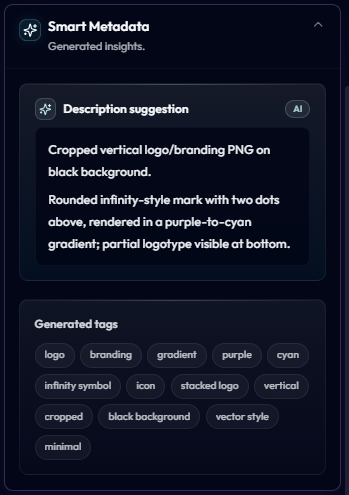
Smart Metadata panel showing an AI-generated description and tags for a Reloops logo asset.
What gets generated
When an asset finishes uploading, Reloops runs it through the AI pipeline and produces:- Description suggestion - a short natural-language summary of the asset (composition, subject, style, colors, background, layout).
- Generated tags - a list of single and multi-word tags covering subject, format, color, style, and context.
- Captions / OCR - any text visible inside the file is extracted so it becomes searchable.
- Visual analysis - shape, color palette, and content signals used for semantic matching.
Reviewing and editing Smart Metadata
- Open any asset from a project or from search results.
- Expand the Smart Metadata panel in the asset sidebar.
- Click the AI description suggestion to accept it as the asset description, or edit it inline before saving.
- Generated tags can be removed individually, and you can add your own manual tags at any time.
When tagging runs
AI tagging runs automatically when:- A new asset is uploaded to any project
- A new version is added to an existing asset (the new version is re-analyzed)
- You manually trigger Regenerate from the Smart Metadata panel
AI credits
Smart Metadata generation uses AI credits from your workspace balance. Each asset analyzed (or re-analyzed) consumes credits based on file type and size - videos cost more than still images because every keyframe is examined. You can monitor your credit usage and remaining balance in Workspace settings -> Billing & limits. If you run out of credits, uploads still succeed but new assets won’t be auto-tagged until credits are topped up or the next monthly allowance resets.Why it matters
- Zero manual work - the team never has to stop and tag files
- Better search - assets are findable by what they look like, not just what they’re named
- Consistent metadata - everyone in the workspace gets the same structured tags
- Faster client delivery - pulling together a deliverable becomes a one-line search instead of a folder hunt